http headers in webapi

Htttp Header:- Http Header is a field of an HTTP request or response that passes additional info about the request or response. For example, a request message can use headers to indicate it's preferred media formats, while a response can use header to indicate the media format of the returned body.


Request Headers:- Headers containing more information about the resource to be fetched or about the client itself or we can say that Http headers that have additional info about the request.Types of Request headers:- 

  • Accept
  • Accept-Encoding
  • Authorization 
  • Origin
  • Referer
  • User-Agent
  • If-Modified Since
  • If-None-Match
  • Cookie
  • Host


Response Headers:- Headers with additional information about the response, like its location or about the server itself (name, version, …). Types of Response Header:-

  • Pragma
  • Server
  • Set-Cookie
  • www-Authentication:- Basic,Bearer Token,Digest etc
  • x-Frame-options
  • Cache-Control
  • Location
  • Expire


Representation Header:- metadata about the resource in the message body (e.g. encoding, media type, etc.). 
OR
Http headers that additional info for both request and response but no relation with the data transmitted in the body . They are formely known as General headers.
  • Content-Type
  • Content-Encoding
  • Content-Length
  • Connection
  • Transfer-Encoding  

Fetch Metadata Request Header:- Headers with metadata about the resource in the message body (e.g. encoding, media type, etc.).

  • Sec-Fetch-Site
  • Sec-Fetch-Mode
  • Sec-Fetch-User
  • Sec-Fetch-Dest  

Note:-The current HTTP/1.1 specification no longer refers to entities, entity headers or entity-body. Some of the fields are now referred to as Representation headefields.


Difference between Accept header and Content-Type header

The Accept header attribute specifies the format of response data which the client expects.


GET /posts HTTP/1.1 

Accept:application/json 


GET /posts/42 HTTP/1.1 

             Accept: application/xml 


Content-Type header attribute specifies the format of the data in the request body so that receiver can parse it into appropriate format.


             ContentType: application/x-www-form-urlencoded

             ContentType: application/multipart/form-data


How to upload large files using MVC


 This is the third post of file upload in mvc ,first was Upload a File In MVC , second was  Upload Multiple File In MVC  and this is Third "Big File Upload In MVC". In ASP.NET default size of uploading a file is 4MB if  we want to upload a file bigger than 4MB size than we need to have some changes in Web.config file. Lets start

Step1:- For creating a file upload application follow this link Upload a File In MVC  or  Upload Multiple File In MVC    

UploadFile.Cshtml

@{
    ViewBag.Title = "UploadFile";
}
<h2>UploadFile</h2>
 
@using (Html.BeginForm("UploadFile""FileUploading"FormMethod.Post, new { enctype = "multipart/form-data" }))
{
    <div>
        <br />
        <input type="file" id="files" name="files" multiple>
        <input type="submit" value="Upload" />
        @ViewBag.Message
    </div>
}

Differences between Row_Number(), Rank(), Dense_Rank() Functions in SQL Server


All three function  known as a window function in Microsoft SQL Server, the difference between rank()dense_rank(), and row_number() comes when you have duplicate records in a columns where you want to apply ranking For example, if you are ranking employees by their salaries then what would be the rank of two employees of the same salaries? It depends on which ranking function you are using like row_number, rank, or dense_rank.


CREATE TABLE [dbo].[employee](
       [id] [int] 
IDENTITY(1,1) NOT NULL,
       [name] [nvarchar]
(50) NULL,
       [age] [int] 
NULL,
       [salary] [decimal]
(18, 0) NULL
)


SELECT *
FROM employee


ROW_NUMBER():- The row_number() function always generates a unique ranking even with duplicate records. As you can see below in  query result.


SELECT *,
       
ROW_NUMBER() OVER (ORDER BY id) AS Ranking
FROM employee


RANK():-  The rank() function will assign the same rank to the same values . But, the next different rank will not start from immediately next number but there will be a double increment like u can see in employee id 1 that is start from ranking 3 skip the ranking 2.


SELECT *,
       RANK() OVER (ORDER BY salary ) AS Ranking
FROM employee


Dense_Rank():-  The dense_rank function is similar to the rank() window function i.e. same values will be assigned the same rank, but the next different value will have a rank which is just one more than the previous rank.


SELECT *,
       DENSE_RANK() OVER (ORDER BY salary ) AS Ranking
FROM employee


WebApi2 Interview Question


  1. What is API.
  2. What is WebAPI.
  3. What is Asp.NET  WebAPI.
  4. What is Rest or Restfull architecturure.
  5. Naming Convention In WebAPI.
  6. What is Routing in WebAPI and How to configure WebAPI.
  7. Difference between MVC Controller And WebAPI Controller.
  8. What is Parameter Binding  in WebAPI. What is the default parameter binding process and how we can change it.
  9. Different types of Http request in Web API and their status code. What is the difference between Http Post and Put request.
  10. Action method return type of WebAPI. What is difference between HttpResponseMessage and IHttpActionResult.
  11. What is Data Formats in WebAPI. What is difference between Accept and Content-Type attribute. 
  12. How we can Authenticate a WebAPI. Difference between Basic Authentication and Token Based Authentication.
  13. What is  Media-Type Formatters in WebAPI.
  14. How to consume Web API in ASP.NET MVC and what is the difference between WebClient and HttpClient.
  15. What is Same Origin Policy of web browser. What is Cross-Origin Resource Sharing (CORS) and how to enable it in WebAPI.
  16. What is oData in WebAPI.
  17. What Web API versioning.   
  18. Difference between Asp.NET WebAPI and Asp.NET MVC
  19. Difference between GET and POST request.
  20. What is Content Negotiation.

SQL-Server Interview Question.


  1. What is Database Management System.
  2. What is Relational Database Management  System.
  3. What is Data Integrity.
  4. What is Data Consistency.
  5. What is Referential Integrity.
  6. What is Cascade Delete.
  7. What is Data Anomalies. Types of Data Anomalies.
  8. What is Relationship in RDMBS and Different types of Relationship.
  9. What is Normalization. Different kind of Normalization.
  10. What is Denormalization.
  11. Difference .MDF file and .LDF file in SQL-Server.
  12. Difference between Attach and Restore in SQL-Server.
  13. Difference between DML,DDL,DCL statement in SQL-Server.
  14. Difference between Where and Having Clause.
  15. Difference between Truncate and Delete command.
  16. Difference between Identity and Sequence in SQL-Server.
  17. Difference between @@identity, @scopeidentity, and @ident_current.
  18. What is Constraints. Different types of Constraints In SQL-Server.
  19. What is Primary Key and Foreign Key ad difference between Primary Key and Unique Key.
  20. What is Composite Key, Alternate Key, Candidate Key and Super Key in RDBMS.
  21. What is Indexes. Different types of Indexes in Sql-Server.
  22. Use of Filtered Index, Spatial Index, Fulltext Index, Xml Index, ColumnStore Index in SQL-Server.
  23. Difference between Cluster Index and Non Cluster Index.
  24. What is Function. Difference types of Function.
  25. Difference between Scaler Function and Table Valued Function in SQL-Server.
  26. Difference between IsNull() and Coalesec() function.
  27. Difference between Cast() and Convert() function in Sql-Server.
  28. Difference between Row_Number(), Dense_Rank(),Rank() function .
  29. Difference between Floor(),Rand(),Ceiling() function in SQL-Server.
  30. Difference between DateDiff(), DatePart() Function in SQL-Server.     
  31. What is Procedure .Different types of Procedure in SQL-Server.
  32. Difference between Procedure with Output Value and Procedure with Return keyword.
  33. Difference between Function and Procedure.
  34. What is Trigger in SQL-Server. Difference types of Trigger in SQL-Server.
  35. What is Magic Tables in SQL-Server.
  36. What is Inserted and Deleted table in SQL-Server.
  37. What is Join in SQL-Server. Difference types of SQL-Server.
  38. Explain Inner Join, Left Join, Right join, Full-Join, Cross Join .
  39. What is Apply operator in SQL-Server. Types of Apply Operator.
  40. Difference Between Join and Apply in SQL-Server.
  41. What is Union and Union All Operator in SQL-Server.
  42. Difference between Union and Union All .
  43. Difference between Join and  Apply operator in SQL-Server.
  44. What Is Temp table. Difference between local and global temp table.
  45. What is View. Types of view in SQL-Server. Benefit of using view in SQL-Server database.
  46. What is CTE.
  47. What is Cursor in SQL-Server.
  48. What is Transaction. Explain ACID properties of Transaction.


MVC Interview Question


  1. What is MVC Pattern. Explain Model ,View and Controller.
  2. What is  MVC life Cycle. Four Main Steps in MVC Life Cycle.
  3. What is Routing. How routing works. Two Types of Routing in MVC 5.
  4. What is Route Constraints. Where we can declare route constraints.
  5. What  is filters. Explain five types of filters in MVC5.
  6. How many filters default filters provided by MVC5.
  7. What is Output Cache Filter. Different types of attribute of Output Cache filter. How many location we can cache the Controller Data.
  8. What is Razor View and Razor View Engine in MVC.
  9. What is Layout. Difference between RenderBody() and Render Section() Method.
  10. What is Partial View. How we can consume Partial View in MVC.
  11. Difference between @Html.Partial and @Html.renderpartial method.
  12. Difference between @Html.Action and @Html.RenderAction method
  13. Difference between Partial View and View. 
  14. Difference between ViewBag, ViewData and TempData.
  15. Difference between Peek and Keep Method.
  16. What is Action Method. Explain different types of Action method provided by MVC5.
  17. Difference between ActionResult and JsonResult Action Method.
  18. Difference between RedirectToRoute and RedirectToAction.
  19. Difference between Redirect and Redirect Permanent.
  20. What is Child Action Method.
  21. What is Action Selectors in MVC. Explain three types of Action Selectors.
  22. Difference between ActionVerb , NonAction,  ActionName attribute in MVC.
  23. What is Server side and Client-Side Validation in MVC. How to enable Client side validation in MVC.
  24. What is Data Annotation. Different types of Data Annotation in MVC.
  25. Difference between Display and Display name attribute in MVC.
  26. What is Helper Class in MVC. Different types of Helper class in MVC.
  27. Difference between HTML  Helper Class,  Url Hlper Class, Ajax Helper Class in MVC.
  28. What is Different type of Html Helper. Difference between @Html.Display and @Html.DisplayFor Helper class.
  29. What is Bundling and Minification in MVC.
  30. How we can create multiple submit button on single view. 

Entity Framework Interview Question

  1. What is ORM.Different types of ORM
  2. What is Entity Framework.
  3. What is Entity Data Model.Expalin Core Parts of EDM.
  4. Expalin Storage Schema Model,Conceptual Model,Mapping. 
  5. What is Data Annotaion.Different Types of Data Annotaion.
  6. What is entity relationship and types of entity relationship
  7. Difference between Seed and Sql Method
  8. What is  Lazy ,Eager and Explicit Loading
  9. Difference between Code First and DbFirst
  10. What is T4 Template
  11. What N+1 problem in Lazy Loading
  12. What is Context Class
  13. Difference between Dbcontext and Object Context Class
  14. What is Connected and Disconnected Scenario.

Jquery Interview Question

  1. What is jQuery
  2. Diff between $(document).Ready() and $(windows).load()
  3. What is JQuery.noConflict.
  4. What is DOM
  5. What is jQuery Selectors
  6. What is jQuery Filters
  7. What is jQuery Methods
  8. Difference between text, html, text ,val method.
  9. Difference between empty vs remove method.
  10. Difference between append and after method.
  11. Difference between $('Selectors').each() and jquery.each() method.
  12. What is jQuery ajax method and its attributes
  13. What is get,post,load method of jQuery.
  14. Difference between get and post request.
  15. What is jQuery Method Channing
  16. What is Callback function in jQuery
  17. What is JSON
  18. What is AJAX
  19. What is unobtrisive JavaScript
  20. How to create and pass an array in ajax method
  21. How to create and pas an array of object in ajax method.
  22. JSON.parse vs JSON.Stringify


how to use automapper in webapi


AutoMapper:- AutoMapper is an object-object mapper. Object-object mapping works by transforming an input object of one type into an output object of a different type. What makes AutoMapper interesting is that it provides some interesting conventions to take the dirty work out of figuring out how to map type A to type B. As long as type B follows AutoMapper’s established convention, almost zero configuration is needed to map two types.


Step 1:- Create a web api project in visual studio 


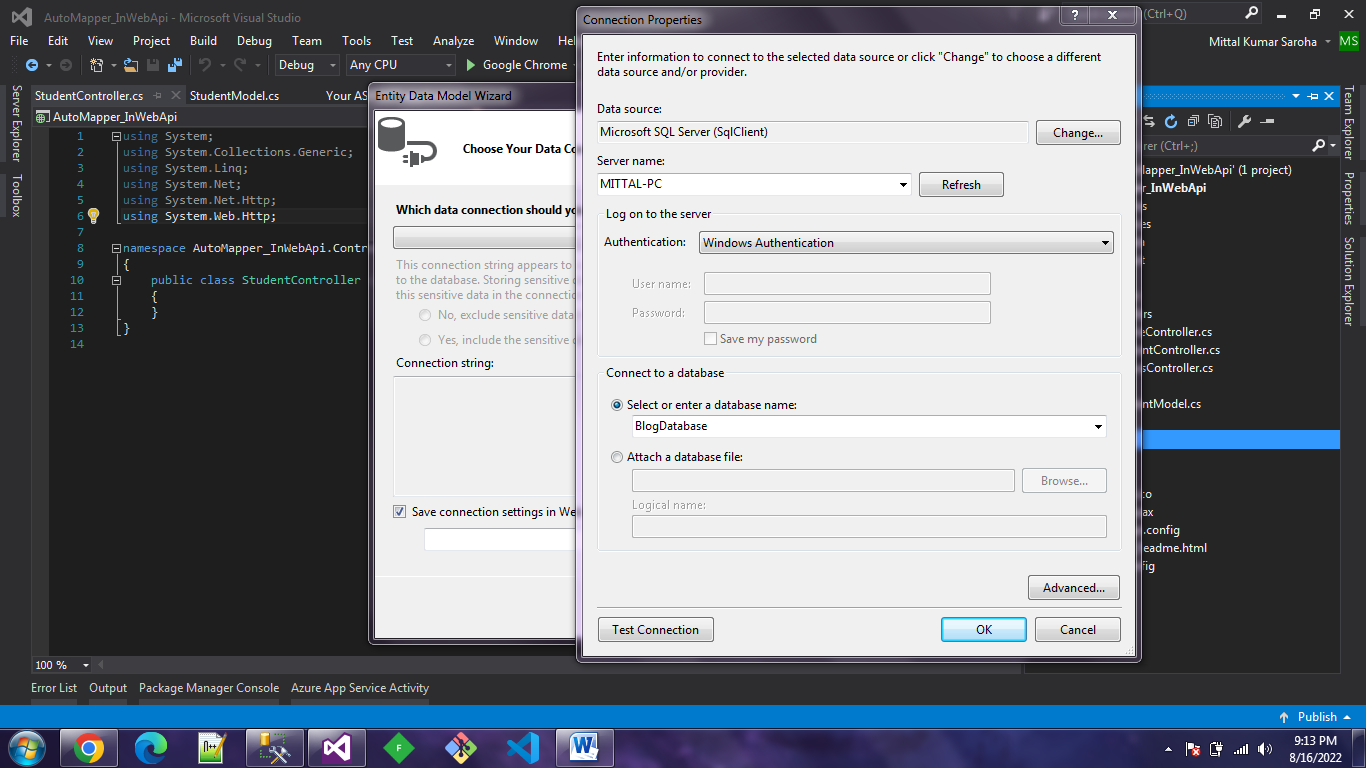
Step 2:- Now create a table in Sql-Server and link this table to your application using DbFirst Approach.  


CREATE TABLE [dbo].[tblStudent](
       [Id] [int] IDENTITY(1,1) NOT NULL,
       [Name] [nvarchar](50) NULL,
       [DOB] [date] NULL,
       [Course] [nvarchar](50) NULL,
 CONSTRAINT [PK_tblStudent] PRIMARY KEY CLUSTERED
(
       [Id] ASC
)WITH (PAD_INDEX = OFF, STATISTICS_NORECOMPUTE = OFF, IGNORE_DUP_KEY = OFF, ALLOW_ROW_LOCKS = ON, ALLOW_PAGE_LOCKS = ON) ON [PRIMARY]
) ON [PRIMARY]
 
GO


Step 3:- Create a folder Dto in your Soultion folder and add a class file with StudentModel
namespace AutoMapper_InWebApi.Dto
{
    public class StudentModel
    {
        public int Id { get; set; }
        public string Name { get; set; }
        public string DOB { get; set; }
        public string Course { get; set; }
    }
}


Step 4:- Now install AutoMapper in your project soulution from menu bar in visual studio

 Tools>Nuget Package Manager>Manage Nuget Packages for solutions ,you can check automapper compatible version according to to your visual studio in Version dropdown in right side  


Step5:- Add a folder in Solution Helpers and add a class file with name ApplicationMapping.cs 

using System;

using System.Collections.Generic;

using System.Linq;

using System.Web;

using AutoMapper;

using AutoMapper_InWebApi.Dto;

using AutoMapper_InWebApi.Models;


namespace AutoMapper_InWebApi.Helpers

{

    public class ApplicationMapping:Profile

    {

        public ApplicationMapping()

        {

            CreateMap<tblStudent, StudentModel>().ReverseMap();

        }

    }

}


Step 6:- Now Add a Empty Controller with name Students in Your Controller folder and Paste the following code in this Controller.cs file   

StudentsController.cs

using AutoMapper_InWebApi.Dto;

using AutoMapper_InWebApi.Models;

using System.Collections.Generic;

using System.Linq;

using System.Net;

using System.Web.Http;

using AutoMapper;


namespace AutoMapper_InWebApi.Controllers

{

    public class StudentsController : ApiController

    {

        BlogDatabaseEntities _context = new BlogDatabaseEntities();


        public IEnumerable<StudentModel> GetStudents()

        {

            var students = _context.tblStudent.ToList().Select(Mapper.Map<tblStudent,StudentModel>);

            return students;

        }


        public StudentModel GetStudentById(int id)

        {

            var student = _context.tblStudent.SingleOrDefault(c => c.Id == id);

            if (student == null)

                throw new HttpResponseException(HttpStatusCode.BadRequest);

            return Mapper.Map<tblStudent,StudentModel>(student);

        }


        public StudentModel PostStudent(StudentModel model)

        {

            if (!ModelState.IsValid)

                throw new HttpResponseException(HttpStatusCode.BadRequest);


            var student = Mapper.Map<StudentModel, tblStudent>(model);

            _context.tblStudent.Add(student);

            _context.SaveChanges();

            model.Id = student.Id;

            return model;

        }


    }

}


Step7:- Now run your and check it in Postman or fiddler